Connecting an ELM327 OBD-II adapter to Cardashly, step by step
The three-step connection flow, Bluetooth versus Wi-Fi adapters, which engine values to expect, and what to check when the screen shows dashes or a connection fails.
By the Cardashly teamPublished 5 min read
Disclosure: we make Cardashly, a car dashboard app for Android. We point out where it fits and where it does not, and we take no payment for mentioning other products. How we write these guides
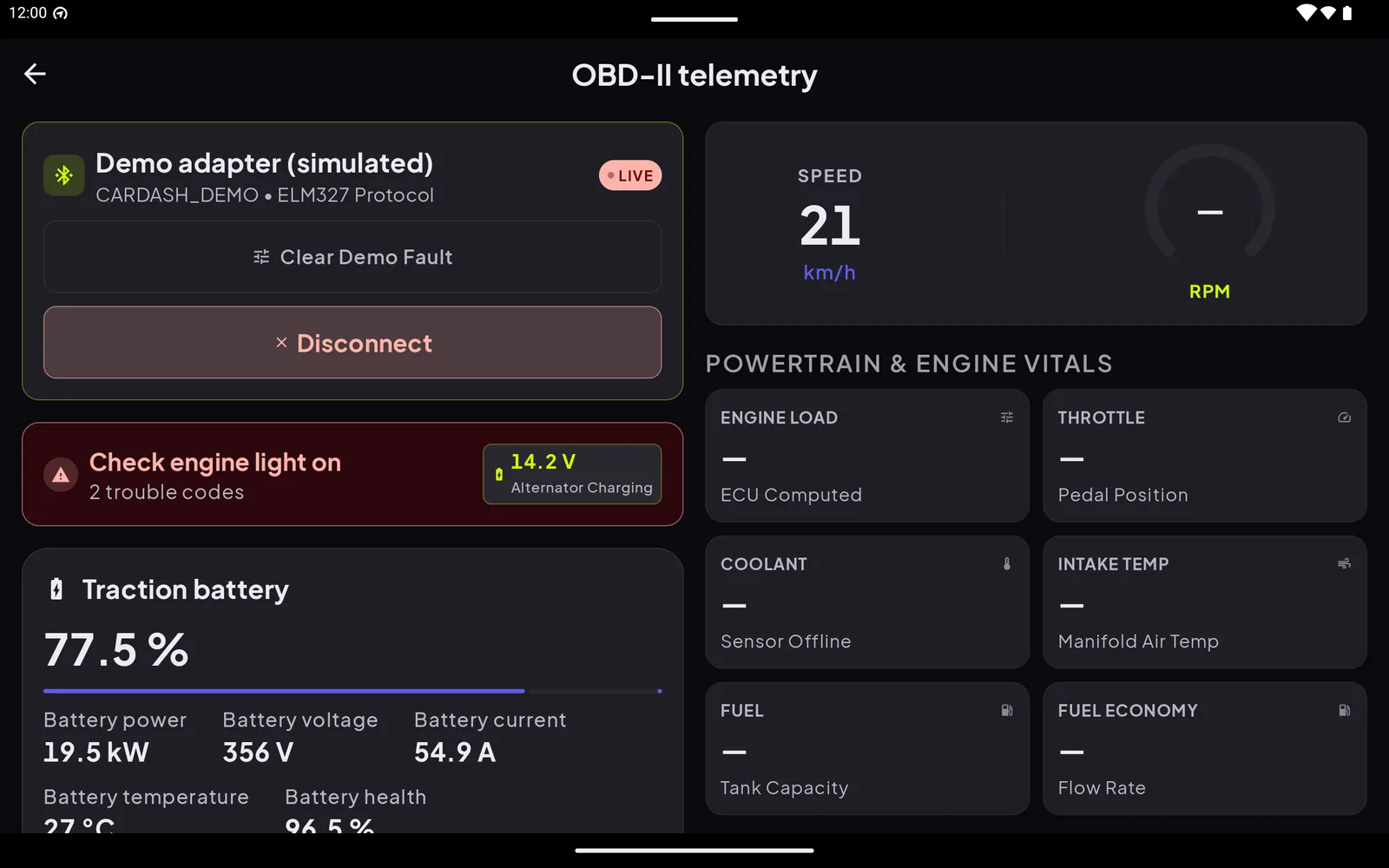
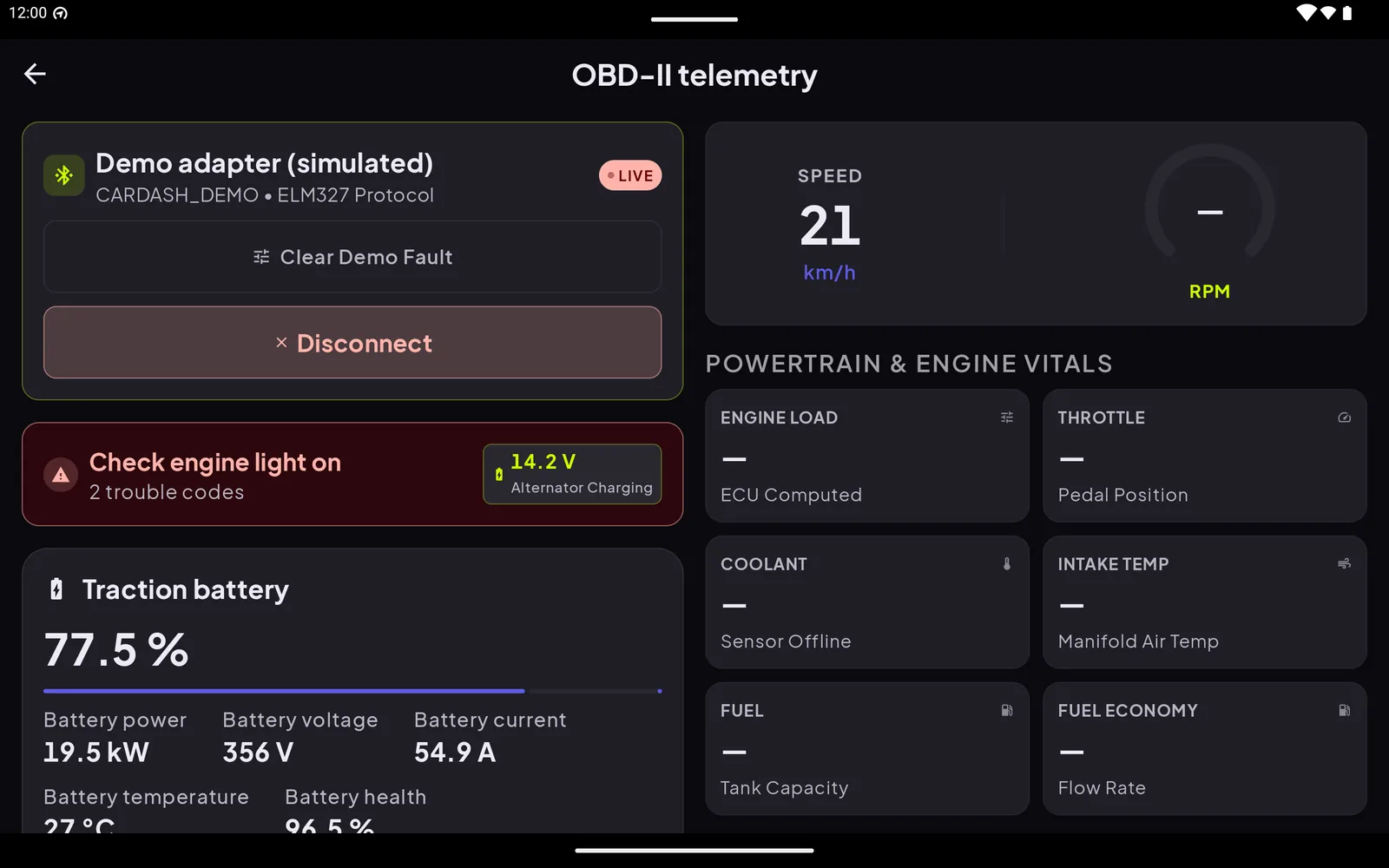
This guide covers how the OBD connection works in Cardashly and what to check when it does not. It describes the current version of the app, based on its connection code and on the screens you see during setup. It does not rate specific adapter brands, because that would need a hands-on test of each one.
One thing to know first: live OBD data is a Premium feature in Cardashly, while the speedometer, navigation and the rest of the dashboard stay free. The app's Premium screen shows the current plans and whether a free trial is offered.
Before you open the app
Two things have to be true before any app can talk to the car:
- The adapter is plugged into the OBD-II port. On most cars it is a 16-pin socket under the dashboard near the steering column. The owner's manual shows the exact spot.
- The car is switched on. The adapter gets its power from the port, and the engine computer usually only answers once the ignition is on.
If you are choosing an adapter, our guide to modernizing an older car covers what OBD-II is and what it can and cannot do.
The three-step flow
Cardashly walks you through the connection in a short wizard titled "Connect OBD adapter". The steps are labelled Plug in, Bluetooth and Connect.
Step 1: Plug in
The first screen tells you to find the OBD port, push the adapter in, and switch the car on so the adapter has power.
Step 2: Bluetooth
Sit in the driver's seat with Bluetooth on. The app asks for Android's Nearby devices permission, which it needs to find and connect to the adapter. There is a catch on some Android versions: finding Bluetooth Low Energy adapters can also require the location permission, and the app says so on this screen. An adapter you already paired in Android's Bluetooth settings shows up without it.
Step 3: Choose your adapter
The app lists adapters in range plus the ones you have paired. Pick yours and it connects. If nothing appears, the app suggests checking that the adapter is plugged in and the car is on, and offers a "Search again" button. An older adapter may need pairing in Bluetooth settings first, and there is a shortcut button for that.
Bluetooth or Wi-Fi?
The app can talk to an adapter three ways:
- Bluetooth Classic. The adapter must be paired in Android settings first. This is the most common kind of cheap adapter.
- Bluetooth Low Energy. The app can scan for these itself, for about 15 seconds.
- Wi-Fi. You enter the adapter's IP address and port. Wi-Fi adapters create their own network, so the phone has to join it, which can interrupt mobile data while it is connected, so Bluetooth is often the easier choice.
What you will see
Once connected, the app keeps polling the car, pausing half a second between rounds, so a full refresh can take a second or two on a slow adapter. Depending on what your car answers, the telemetry screen can show:
- Vehicle speed and engine RPM
- Engine load and throttle position
- Coolant, intake-air and oil temperature
- Fuel level and fuel economy
- Battery or module voltage
- Whether the check-engine light is on, and how many trouble codes are stored
- The VIN, when the car reports it
For electric cars the screen also shows a traction-battery card (state of charge, power, voltage and current) when the car answers those requests.
A dash means "not reported". Each car supports a different set of values. In the capture above, which uses the demo adapter, RPM, throttle and coolant show a dash. That is how an unanswered value looks, and it is not an error. If a value you expect is missing on a real car, it is likely that car's engine computer does not expose it through the standard requests.
Try it without a car
The app includes a demo adapter that simulates a car, so you can look at the screens before buying hardware. The screenshot in this guide was captured that way. It shows the layout, not real driving data.
Keeping the connection alive
While a real adapter is connected, Cardashly runs a foreground service so the link and the readings keep going if you switch to another app during a drive. Android shows a persistent notification for it. The demo adapter does not start a service.
When it will not connect
Work through these in order:
- Is the ignition on? This fixes most "no data" cases.
- Is the adapter powered? Most have an LED. Re-seat it in the port.
- Permissions. Nearby devices must be allowed; on some Android versions BLE scanning also needs location.
- Is it already connected elsewhere? An adapter generally talks to one device at a time. Close any other OBD app first.
- Pairing. For Bluetooth Classic adapters, pair in Android settings, then come back and choose it from the list. The app shows "Connection Failed" if the link cannot be opened.
If the link opens but every value is a dash, the adapter is connected but the car is not answering. Try with the engine running.
For what to do with the numbers, see using your phone as a speedometer and the setup basics in how to turn your phone into a car dashboard.
Frequently asked questions
- Does Cardashly work with a Wi-Fi ELM327 adapter?
- Yes. You enter the adapter's IP address and port in the app. The phone has to join the adapter's own Wi-Fi network first, which can interrupt mobile data while it is connected.
- Why does the app ask for Nearby devices permission?
- Android requires it for an app to find and connect to Bluetooth devices. On some Android versions, scanning for Bluetooth Low Energy adapters also needs the location permission; adapters you already paired do not.
- Why do some values show a dash?
- Each car reports a different set of values through OBD-II. A dash means the car did not answer that request, which is normal.
- Can I try the OBD screens without an adapter?
- Yes. A built-in demo adapter simulates a car so you can see the telemetry layout. The numbers are simulated, not real.
Turn your phone into the cockpit
Cardashly puts a big glanceable speedometer, maps, music and one-tap calling on one dark, landscape screen, in any car. Free on Google Play.